SAP Joule + SAP Analytics Cloud: How Conversational AI Is Changing Reporting
If you’ve been following SAP’s journey into Artificial Intelligence, you’ve probably heard about Joule. It’s SAP’s AI copilot, designed to make working with enterprise software feel more natural and conversational.
But there’s something interesting happening when Joule meets analytics, and it’s worth understanding why setting this up isn’t quite as simple as flipping a switch.
The Promise: Analytics That Feel Like Conversation
Imagine asking your enterprise system a question the same way you’d ask a colleague.
“Show me monthly sales trends by region”
“How has our headcount grown across departments?”
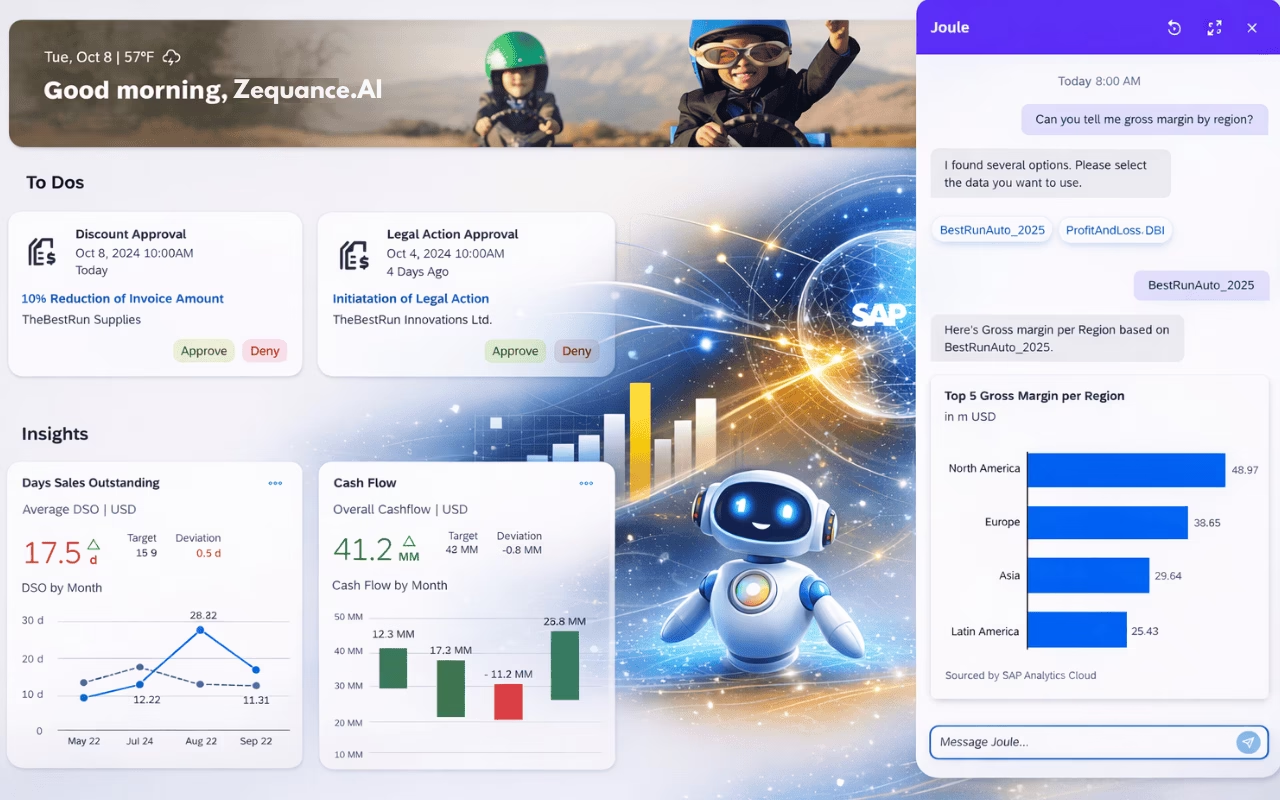
Instead of navigating through menus, building reports, or writing queries, you simply ask. Joule responds with charts, comparisons, and insights, all delivered right there in the conversation.
This is what happens when Joule connects with SAP Analytics Cloud. You’re not just getting automated answers anymore. You’re getting real analytical power wrapped in a conversational interface. The system understands context, recognizes your role, and surfaces insights at exactly the moment you need them.
But here’s the thing that catches many people off guard: enabling this capability involves a surprisingly detailed setup process. And that’s not because SAP made it complicated for no reason. It’s because making AI work safely with your most sensitive business data requires careful orchestration.
Why This Isn’t Just Another Chatbot
The difference between Joule and a generic AI assistant becomes clear when you consider what Joule needs to know before answering even a simple analytical question.
It needs to understand, who you are as a user, what data you’re permitted to see, which analytical models exist in your organization, and how to securely retrieve and visualize that information within your specific workflow.
Think about the data that flows through SAP Analytics Cloud in your organization. Revenue figures, headcount numbers, forecasts, operational metrics. This isn’t information you can expose casually through an AI interface.
The same governance rules that protect this data in your traditional analytics tools need to apply when Joule is involved. That’s why activating analytical insights isn’t a single toggle. It’s a controlled process that touches identity management, analytics configuration, navigation systems, and integration layers.
The Architecture: Where Everything Lives
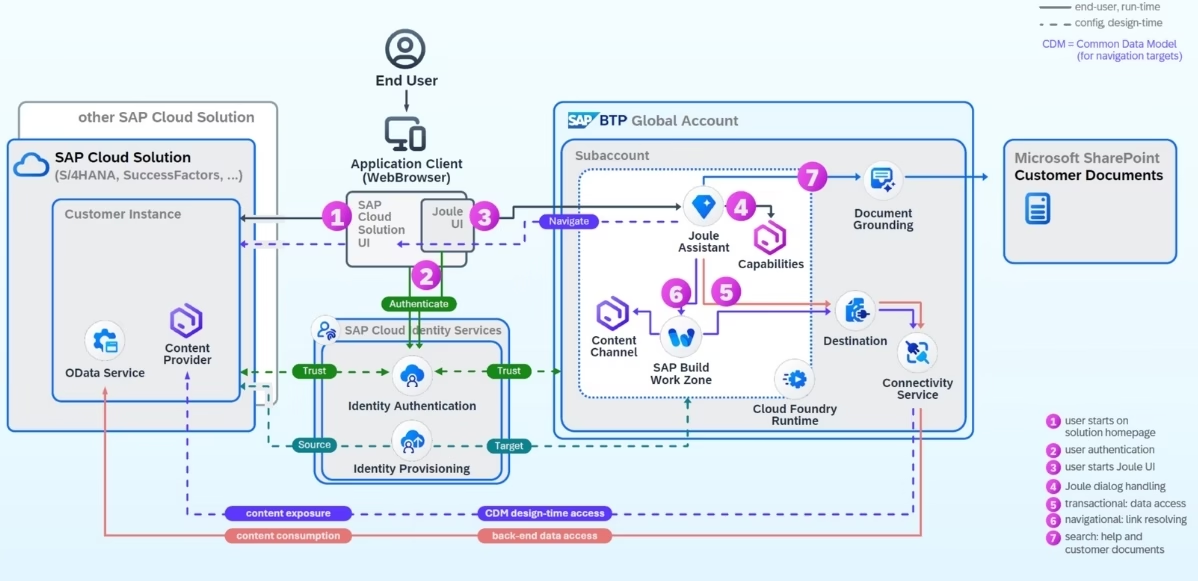
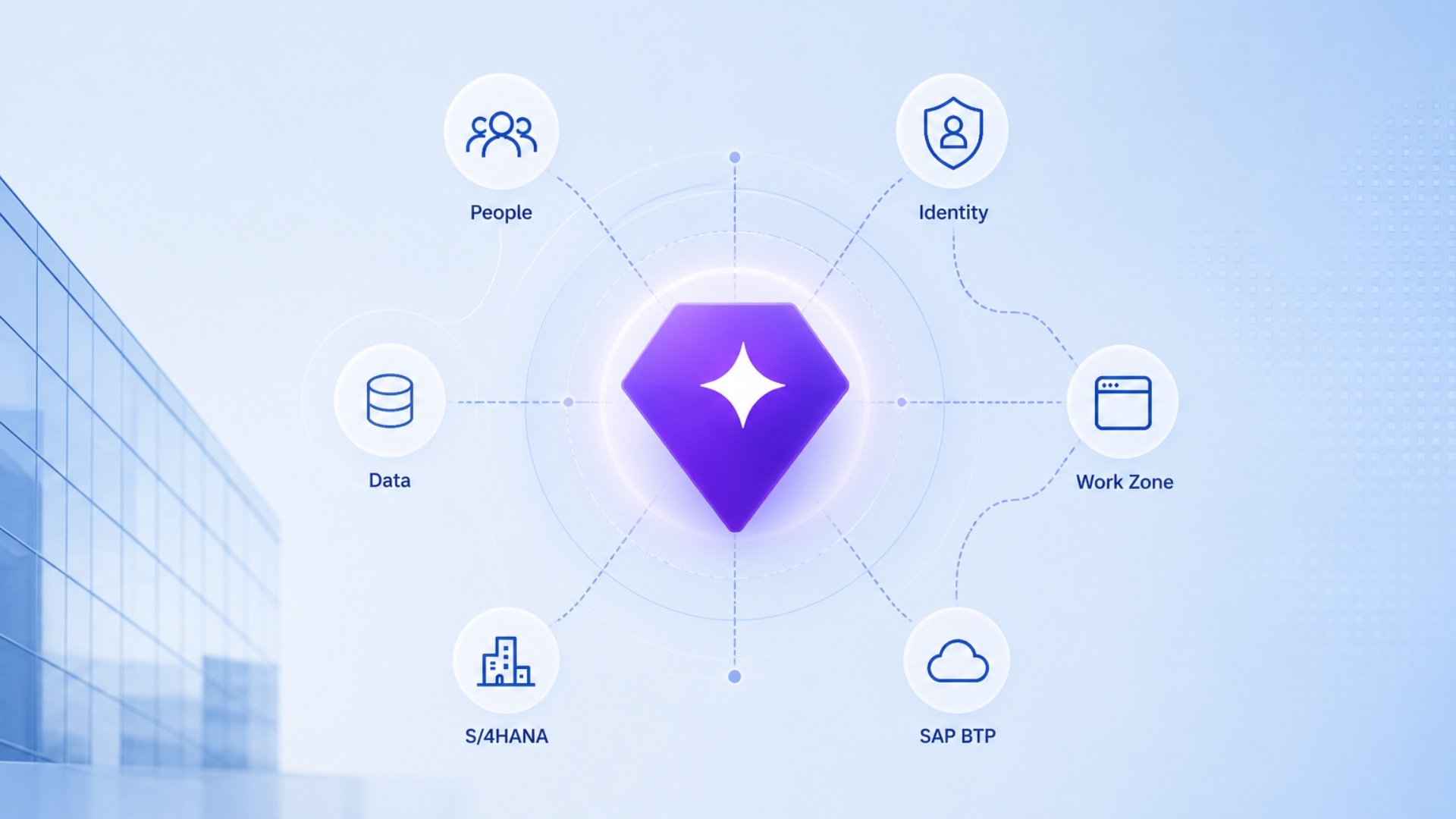
Joule operates as a service on SAP Business Technology Platform, which gives SAP a way to apply consistent security and integration patterns across different regions and environments. This matters especially for analytics because BTP provides the foundation for managing who can access what, and how different systems talk to each other securely.
When you’re setting up Joule with SAP Analytics Cloud, you’re essentially building bridges between several different systems. Each bridge needs to be constructed carefully, with the right permissions and protocols in place. This is why SAP calls out specific personas who need to be involved:
- Your SAP Analytics Cloud administrators who control data access
- Your BTP Global Account administrators who manage the platform services
- Your Cloud Identity Services administrators who ensure everyone’s identity is properly recognized across systems.
This division of labor isn’t bureaucratic overhead. It reflects a real truth about implementing AI-enabled analytics in enterprises: the work cuts across traditional organizational boundaries.
Identity: The Foundation Everything Builds On
Before Joule can answer a single analytical question, it needs to establish identity.
Who is asking the question?
How did they authenticate?
What analytical roles do they hold?
What privileges apply to their specific identity?
This is why SAP requires SAP Analytics Cloud to integrate with Cloud Identity Services using email-based login. Joule doesn’t maintain its own separate user database.
Instead, it inherits identity and authorization from SAP Analytics Cloud. This design choice carries important implications: Joule can never expose analytics that you couldn’t already access in Analytics Cloud.
The AI experience mirrors your existing security policies. Your governance teams can remain confident that AI isn’t creating shadow pathways to sensitive data.
Stay Ahead in the SAP + AI Era
Join 10,521+ SAP Professionals mastering SAP AI every week. No spam. Unsubscribe anytime.
Preparing Your Analytics for Conversation
Here’s something that might not be obvious at first: AI cannot reason over data that hasn’t been semantically prepared. This is where SAP Analytics Cloud’s “Just Ask” capability comes into play.
Just Ask indexes your analytical models for natural language interaction. It helps the system understand business terms, interpret dimensions and measures, and translate conversational questions into proper analytical queries. When you enable Just Ask on your models, you’re essentially teaching Joule the language of your business.
This step reveals an important principle for anyone implementing AI analytics: the quality of your AI responses depends heavily on how well your underlying data is modeled.
Poorly structured data leads to poor AI answers, regardless of how sophisticated the AI layer might be. So enabling Joule analytics is as much about getting your analytical models ready as it is about configuring systems.
Why You Need an Existing Joule Setup
Here’s an interesting architectural requirement: in the current release, analytical insights in Joule require at least one existing Joule integration with another SAP system, whether that’s SuccessFactors, S/4HANA Cloud, or Build Work Zone.
This requirement tells us something important about SAP’s vision.
Joule isn’t designed to be a standalone analytics bot. It’s meant to be a unified copilot that weaves together analytics with business processes.
Analytics become truly powerful when they’re connected to action, whether that’s in HR, finance, procurement, or operations. A chart about headcount growth becomes more valuable when it appears in the context of a workforce planning process. Sales trends matter more when they inform your pipeline discussions.
Two Paths, Same Destination
SAP recognizes that customers are at different stages of their AI journey, so they’ve designed two scenarios for activation. If you’re starting fresh with Joule, you’ll create a new BTP subaccount, establish a unified identity foundation, and activate Joule using guided missions and boosters.
If you already have Joule running, you’ll reuse your existing BTP subaccount and identity services, adding SAP Analytics Cloud to your current Joule formation without disrupting what you’ve already built.
This flexibility matters especially for organizations taking a phased approach to AI adoption. You can add analytical capabilities when you’re ready, without having to rebuild what you’ve already accomplished.
Understanding Formations
A formation defines which SAP systems are connected to your Joule instance. When you include SAP Analytics Cloud in a formation, you’re telling Joule that analytical capabilities are now available and it can begin orchestrating insights across your connected systems.
Formations serve a governance purpose. They prevent uncontrolled sprawl of system connections. They ensure that systems are explicitly included rather than accidentally exposed. They give you visibility into exactly which parts of your landscape are feeding Joule. Once your formation reaches a “Ready” state, analytical insights become available for users to access.
The Technical Details: OAuth Clients and Destinations
Some of the more detailed aspects of setup involve creating separate OAuth clients for design-time and runtime operations. This separation is intentional and important. Design-time access allows systems like Build Work Zone to discover analytical content, import role definitions, and understand what capabilities are available. Runtime access is what Joule uses when actually executing analytical queries on behalf of users.
Separating these concerns ensures least-privilege access, better auditability, and reduced risk if credentials are ever compromised. Similarly, the destinations you configure between Joule and Analytics Cloud aren’t just administrative overhead. They’re the backbone of secure, enterprise-grade integration. They encapsulate OAuth credentials, token endpoints, and security protocols in a way that supports environment isolation, credential rotation, and centralized governance.
The Role of Build Work Zone
SAP Build Work Zone plays a crucial role that might not be immediately obvious. It acts as the navigation layer, the content aggregator, and the role synchronization point. By importing Analytics Cloud role definitions into Work Zone through the Common Data Model, Joule gains visibility into which users can access analytics, which analytical features are available, and how content should surface in context.
Without Work Zone in the picture, Joule would lack the situational awareness needed to guide users effectively. It wouldn’t know what analytical content to suggest or how to fit insights into your daily workflow.

SAP AI Skills
Very few have SAP AI skills.
Keeping Everything in Sync
User provisioning through the Identity Provisioning Service ensures that users and groups stay synchronized from SAP Analytics Cloud to Build Work Zone.
This synchronization means users only see what they’re entitled to, role changes propagate correctly, and analytical permissions remain aligned across systems. By scheduling these provisioning jobs, organizations can maintain alignment automatically over time without manual intervention.
The End Result: Effortless on the Surface
When all these pieces come together, the experience for end users becomes remarkably simple. Someone asks Joule to show them an analytical chart of monthly sales. Behind the scenes, identity is verified through Cloud Identity Services, permissions are evaluated from Analytics Cloud roles, analytical models are queried, data is retrieved securely through destinations, visual insights are generated by Analytics Cloud, and Joule presents the result conversationally.
To the user, it feels effortless. To the person who implemented it, it represents a carefully orchestrated architecture where identity, security, analytics, and navigation all work in harmony.
Looking Forward
SAP will continue to simplify parts of this setup through automation and improved tooling. But the core architectural principles will remain: identity-first design, governed access, and contextual intelligence. These aren’t just technical requirements. They’re what make it possible to embed trusted analytics into everyday conversations while maintaining enterprise controls.
For organizations serious about becoming intelligent enterprises, this architecture isn’t overhead or complexity for its own sake. It’s the foundation that makes conversational analytics both powerful and safe.
The setup process might involve more steps than simply toggling a feature on, but each step serves a purpose: ensuring that when your people ask Joule for insights, they get answers they can trust, presented in ways that help them make better decisions, all while respecting the governance rules your organization has carefully established.
That’s the real promise of Joule with SAP Analytics Cloud. Not just charts in a chatbot, but intelligent analytics woven naturally into the fabric of how your people work.

Alma TA is SAP AI Solutions Director at Zequance.AI, specializing in SAP Business AI, Joule, AI Core, and generative AI on SAP BTP. Drawing on her background in data science and enterprise analytics, she turns complex SAP AI concepts into practical guidance for consultants, architects, and business leaders.