SAP Joule Integration with S/4HANA: Architecture, Steps, and Key Insights (2026 Guide)
SAP Joule lets users ask a question in plain language and get a role-aware answer from SAP. This guide walks through how Joule connects to SAP S/4HANA Cloud Private Edition: the architecture, the four systems involved, and the 11 high-level integration steps.
- Why the integration matters
- What Joule is and where it runs
- The four systems at the center
- How a question travels through the system
- Steps 1-4: identity and trust
- Steps 5-7: content and connectivity
- Steps 8-11: wiring it together and switching it on
- Constraints to know before you start
- What this means for SAP professionals
Why the integration matters
For years, working in SAP followed one rhythm: navigate, click, execute, repeat. Every insight sat behind a transaction code, and the system never spoke unless you already knew where to look.
Joule changes that. Instead of going to find the data, you ask for it. "Show me overdue invoices" now replaces minutes of navigation, but only if the integration behind that one sentence is built correctly.
This post is not a configuration checklist. It is a guided, high-level look at what happens architecturally when Joule is connected to S/4HANA Cloud Private Edition, and why every layer matters. If you want a lighter, decision-maker view of the same topic, our Joule setup guide for S/4HANA Cloud covers readiness and planning.
What Joule is and where it runs
Joule is SAP's AI assistant (our video guide to SAP Joule shows it in action). If you are new to it, three key facts about SAP's AI copilot is a quick starting point, and our SAP Business AI fundamentals explain where it sits in SAP's wider AI approach.
The natural assumption is that Joule lives inside S/4HANA, like a new Fiori tile or a built-in report. That assumption breaks the moment you look at the architecture.
Joule does not live inside S/4HANA. It lives on SAP Business Technology Platform (BTP). It has no built-in awareness of your S/4 system, your users or your business content. All of that has to be connected on purpose.
This is not a technical footnote. It changes how you plan, design and run the integration. If BTP itself is new to you, our six key BTP concepts for beginners will help the rest of this post land faster.
The four systems at the center
Four systems sit at the center of the integration. Each has a role no other system can fill.
| System | Role in the integration |
|---|---|
| SAP S/4HANA | The business brain: transactions, data and processes. |
| SAP Joule | The AI assistant: conversational and context-aware, running on BTP. |
| SAP Build Work Zone | The interaction layer: navigation engine, role manager and content aggregator. |
| Cloud Identity Services | The trust authority: knows who every user is across every system. |
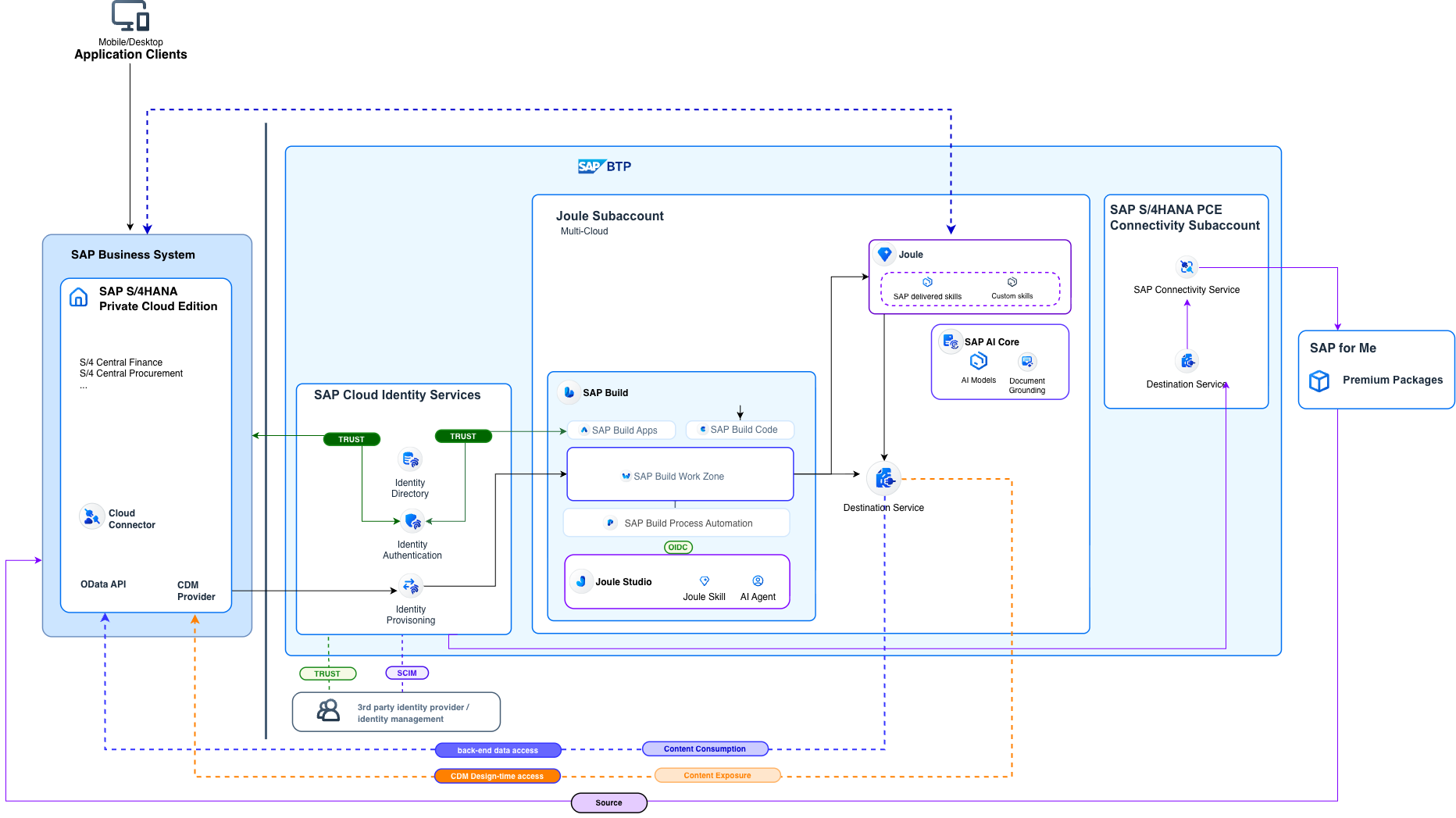
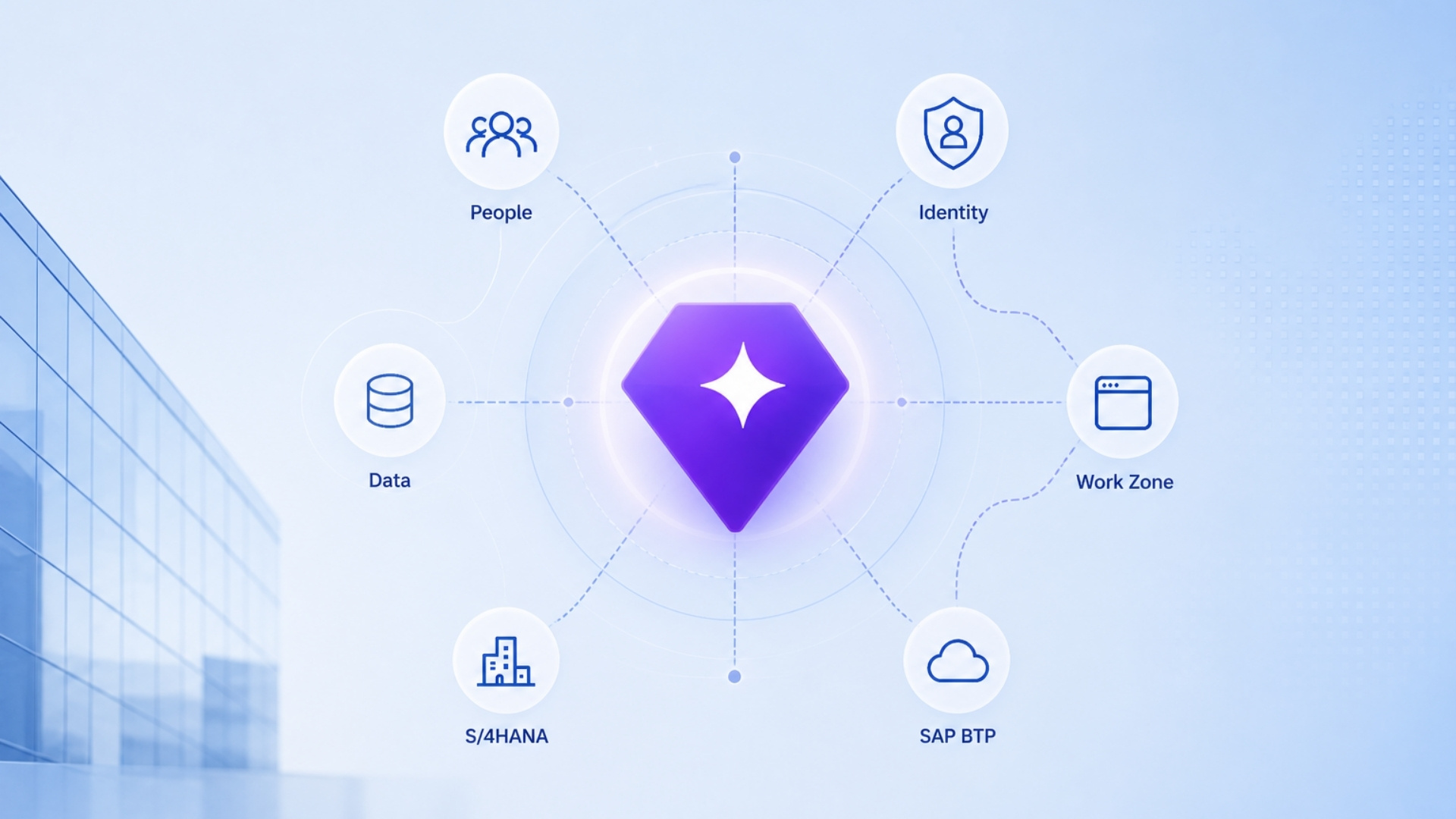
The key point is that none of these systems trusts the others automatically, and none shares context by default. The whole integration exists to build that trust and shared understanding, layer by layer. We saw the same layered thinking in our look at Joule for SAP Ariba, and our architectural blueprint of Joule shows how it fits across the wider landscape.
How a question travels through the system
To see why the integration is complex, trace what happens when a user types "Show me overdue invoices" into Joule:
2 → It checks the user's identity via SAP Cloud Identity Authentication
3 → It validates their roles and data access permissions
4 → It decides which SAP system holds the relevant data
5 → It navigates through Work Zone and Fiori app content
6 → It fetches the data from S/4HANA through configured endpoints
7 → It returns a context-aware, role-appropriate response
Every link in that chain has to be configured correctly. A break at any point means silence, or worse, incorrect output. We also wrote a deeper take on how Joule actually works inside S/4HANA on LinkedIn. The same is true for reporting scenarios, as we explain in why conversational analytics with SAP Analytics Cloud isn't simple.
Steps 1-4: identity and trust
Everything starts with identity. Before any content moves, the systems must know who is asking and be allowed to talk to each other. The diagram below shows the steps as a journey.
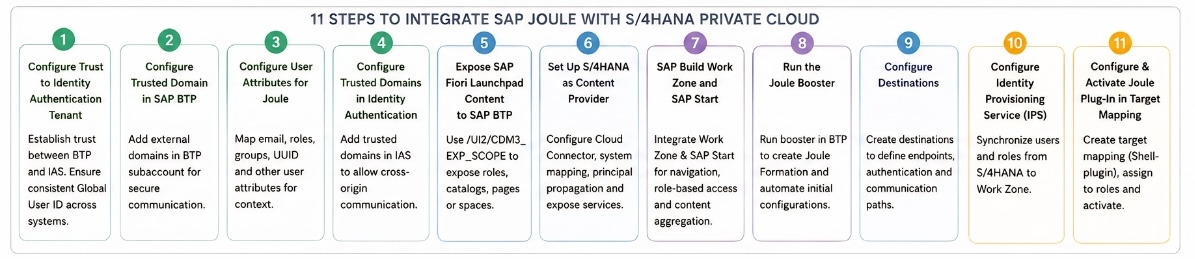
Configure trust to the Identity Authentication tenant
Joule depends on SAP Cloud Identity Services (specifically Identity Authentication, or IAS) to know who the user is, which roles they have and what data they may access. This step sets up trust between your SAP BTP subaccount and the Identity Authentication tenant. Joule is provisioned on SAP BTP, so your global account, subaccount and entitlements must be in place first.
Critical: every user must exist consistently across all systems with the same Global User ID.
Configure the trusted domain in SAP BTP
Even with identity trust in place, systems still do not communicate freely. You explicitly allow communication by configuring trusted domains in SAP BTP. This gives you secure cross-system interaction and controlled exposure of endpoints.
Note: this is communication-level trust, not identity trust.
Configure user attributes for Joule from the Identity Directory
Identity alone is not enough, because Joule needs context. You map email, first and last name, groups and the Global User ID (user_uuid).
Why it matters: this is what lets Joule give relevant, role-based answers instead of generic ones.
Configure trusted domains in Identity Authentication
Now you complete the communication layer from the Identity Authentication side: add trusted domains and allow cross-origin communication.
Why it matters: without this, systems block each other even when identity is configured correctly.
Steps 5-7: content and connectivity
Next, S/4HANA has to make its content visible to the outside world, safely.
Expose SAP Fiori Launchpad content to SAP BTP
Using transaction /UI2/CDM3_EXP_SCOPE, you expose business roles, catalogs, and spaces and pages. This makes your SAP content visible outside S/4 so other services can consume it.
Set up S/4HANA Cloud Private Edition as a content provider
This is where S/4 starts talking to the outside world. Using SAP Cloud Connector, you define system mappings, enable principal propagation and expose UI, OData and content services. If Cloud Connector is unfamiliar, our plain-language explainer covers what it does.
Important: expose only selected resources, because these endpoints become internet-accessible.
Set up SAP Build Work Zone and SAP Start
This is one of the most misunderstood parts. Work Zone is not just a UI layer. It is the navigation engine, the content aggregator and the role-based access controller. Joule relies on it to know where applications are, how to navigate to them and what the user can access. You integrate Joule with Work Zone and SAP Start to enable seamless navigation and role-based access to business applications.
Note: many consultants underestimate Work Zone's architectural role. It is not optional.
Steps 8-11: wiring it together and switching it on
The last four steps connect the pieces, sync the people and make Joule visible.
Run the Joule Booster
This is the orchestration step. The Booster connects all the systems, creates the Joule Formation and applies the initial configuration.
Think of it as: the moment everything you configured starts working together.
Configure destinations
Destinations define system endpoints, authentication methods (OAuth or SAML) and communication paths. Work Zone uses them to fetch content from S/4, and Joule uses them to talk to backend systems.
Why it matters: destinations are the integration backbone.
Configure the Identity Provisioning Service
With the Identity Provisioning Service (IPS) you sync users from S/4 to Work Zone, map roles and groups, and apply transformations.
Why it matters: this keeps Joule's responses role-aware and secure.
Configure and activate the Joule plug-in in a target mapping
Finally, Joule becomes visible. You create a target mapping (Shell-plugin), assign roles and catalogs, and activate the plug-in. Joule then appears inside SAP and users can interact with it in natural language.
Constraints to know before you start
Each of these has derailed real projects, so it pays to know them up front.
Understanding the constraints is as valuable as understanding the steps themselves.

SAP AI Skills
Very few have SAP AI skills.
What this means for SAP professionals
For consultants, architects and technical leads, this integration signals a real shift in the skills the role demands. The work is no longer mainly about configuring isolated modules. It is about designing connected, intelligent ecosystems where identity, platform, UI and AI work as one whole.
The people who will do well here understand not just what to configure, but why each layer exists and how it adds to the intelligence of the whole system. Our piece on how Joule is changing the way consultants work looks at the day-to-day side of that shift, and our guide to SAP AI certification paths helps you choose where to build credentials.
Key takeaways
- Joule runs on SAP BTP, not inside S/4HANA, so the integration has to be built deliberately.
- Four systems are involved: S/4HANA, Joule, Build Work Zone and Cloud Identity Services. None trusts the others by default.
- The 11 steps move through three stages: identity and trust, content and connectivity, then wiring and activation.
- Work Zone is not optional. Joule relies on it for navigation and role-based access.
- Know the constraints early: BTP-native, one Joule instance per Work Zone instance, unified identity, and no mixed deployment types.
We keep our SAP AI guides up to date. To get new ones in your inbox, subscribe to our free SAP AI newsletter at zequance.ai/news.
If you want to go deeper on SAP AI and Joule, the SAP AI Masterclass covers the SAP AI concepts behind this topic.
Your weekly SAP AI brief
10,521+ SAP professionals read it every week. One SAP AI briefing a week: what SAP shipped, what it means for your role, and one thing to try.
Free. No spam. Unsubscribe anytime.

Alma TA is SAP AI Solutions Director at Zequance.AI, specializing in SAP Business AI, Joule, AI Core, and generative AI on SAP BTP. Drawing on her background in data science and enterprise analytics, she turns complex SAP AI concepts into practical guidance for consultants, architects, and business leaders.