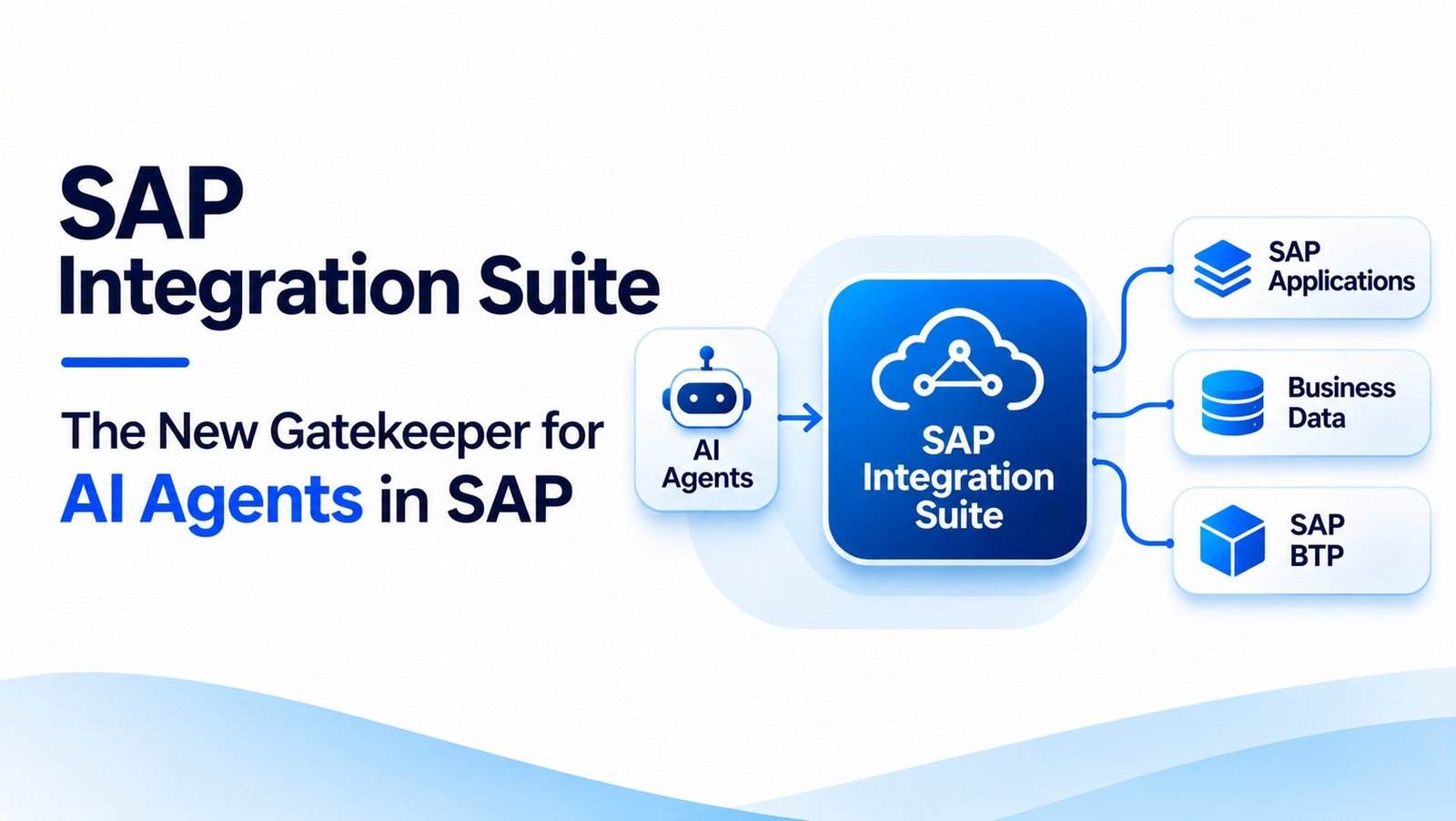
SAP Integration Suite: The New Gatekeeper for AI Agents in SAP
For years, SAP Integration Suite had one job: connect systems so data could move. With AI agents now acting inside business processes, SAP is giving it a second job: deciding what those agents are allowed to touch. The new Enterprise AI Gateway turns Integration Suite into the control layer for SAP AI. This guide explains what changed, how the gateway works, and why the MCP gateway is the clearest example of it.
What the Enterprise AI Gateway is
In the simplest terms, the Enterprise AI Gateway is a checkpoint. Agents do not go straight to your business systems, to other agents or to language models. They go through the gateway, and the gateway decides whether the request is allowed, what data it can see and how much it can do. It is part of SAP Integration Suite.
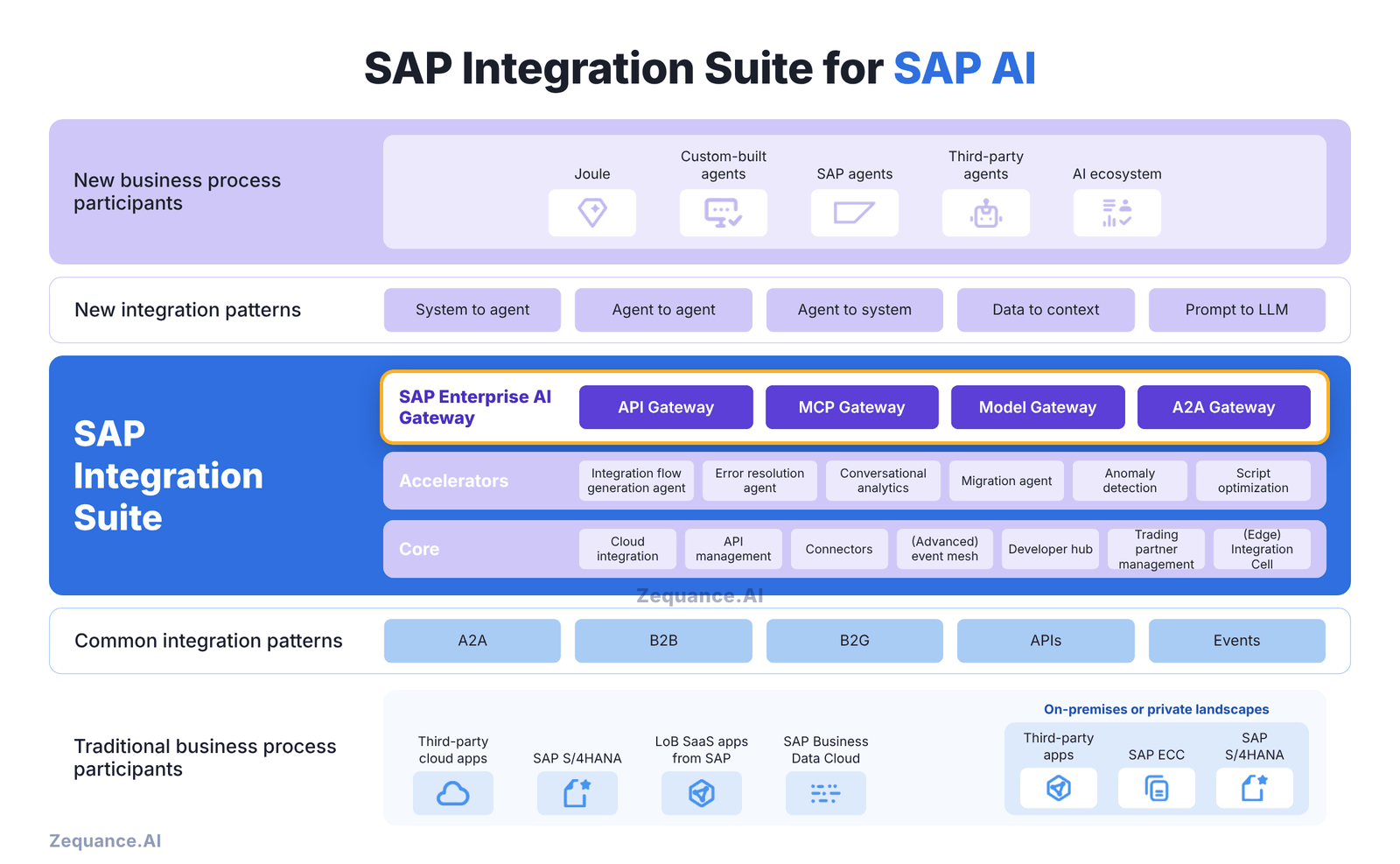
The diagram shows the full picture. At the bottom sit the traditional participants: S/4HANA, SAP ECC, line-of-business SaaS apps, Business Data Cloud and third-party apps, connected through the common patterns (A2A, B2B, B2G, APIs and events). At the top are the new participants: Joule, custom-built agents, SAP agents, third-party agents and the wider AI ecosystem. They bring new integration patterns with them: system to agent, agent to agent, agent to system, data to context and prompt to LLM. The Enterprise AI Gateway is the layer that handles those new patterns.
The gateway covers four kinds of traffic:
The point is that all four share one control plane. You get one monitoring layer, one place to manage traffic, and one set of policies for access, throttling and security, whether the caller is an app, an agent or a model. SAP described AI governance as "a stack, not a single feature", and this is what that means in practice.
If you have followed how SAP secures LLM access on BTP, the Model Gateway idea will feel familiar. It extends the same thinking behind the architecture choices for generative AI on SAP BTP to every agent and every model call.
The MCP gateway: the clearest example
Of the four parts, the MCP gateway is the one you can use and see working today, so it is the best way to understand the whole idea.
The Model Context Protocol (MCP) is the open standard agents use to discover and call tools. An MCP server exposes a set of tools, and an agent picks the ones it needs. With the MCP gateway, you can create an MCP server from:
A fair question is why you would use Integration Suite when plenty of tools can create MCP servers. SAP's answer is the policy layer. On top of every MCP server you can add authentication, authorization, quotas, rate limits, routing, and mediation or transformation steps. The agent only gets the access you designed, and every call is logged.
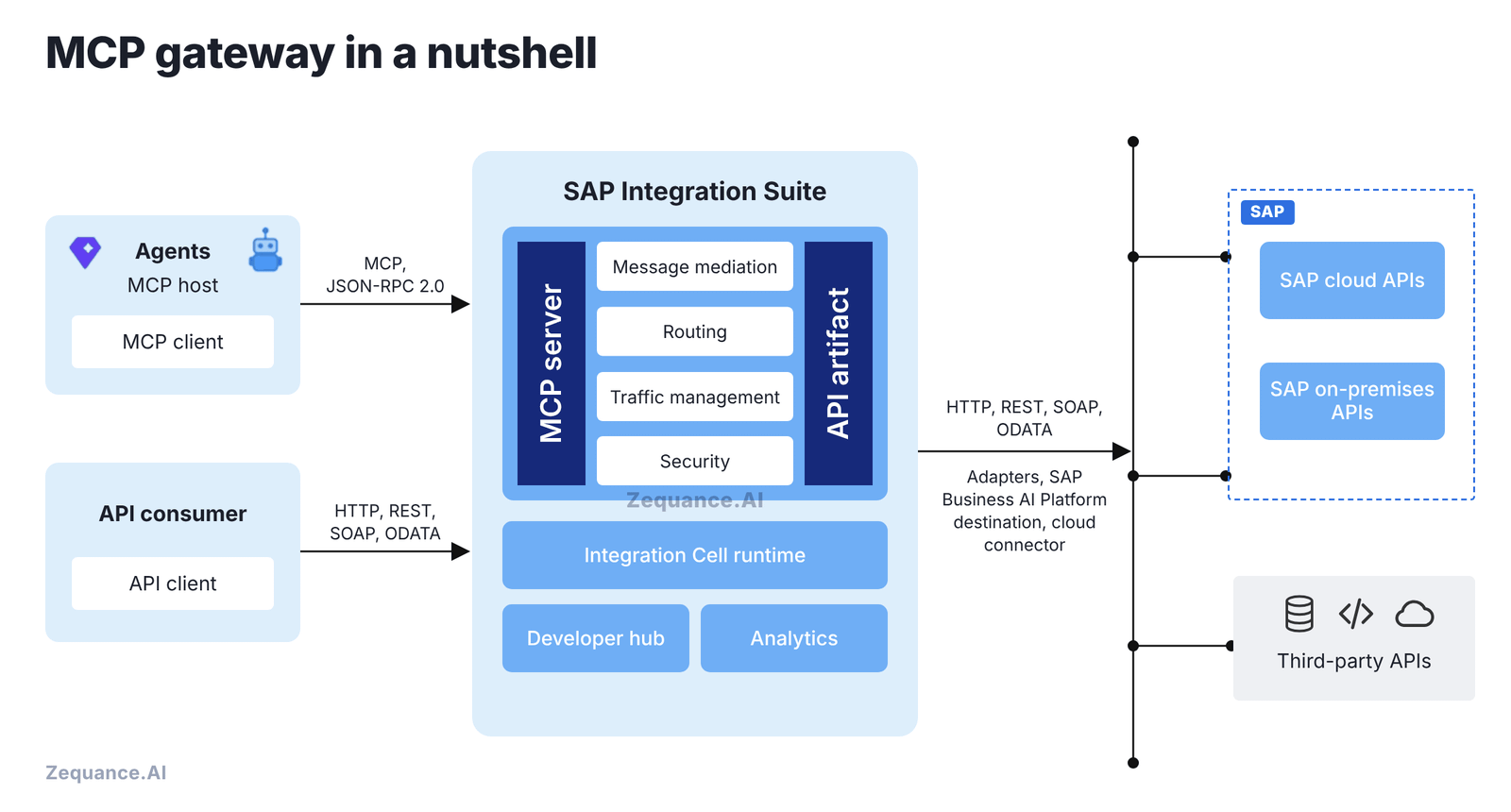
SAP went further than calling it an option. SAP describes the MCP gateway as the endorsed pathway for agents to access SAP APIs, in line with SAP's API policy, and as part of the SAP Architecture Center's reference architecture. The recommendation has three parts:
That covers agents built in Joule Studio, pro-code agents, and agents running on Microsoft Azure, AWS, Google Cloud or IBM Cloud. If an agent touches SAP back-end systems, SAP wants it to go through this gateway.
How it works, step by step
Here is how an MCP server comes together, using a job requisition API as the example. Notice how governance is built in at each step:
02 SOURCE → Pick the source: a deployed API, an OpenAPI spec or an RFC
03 DEFINE → Give the MCP server a name, base path and version
04 SELECT → Choose which resources become tools (for example, 2 of about 390)
05 POLICIES → Default policies apply automatically; add your own on top
06 DEPLOY → Deploy, and the endpoint appears in the monitoring UI
07 PUBLISH → Add the MCP server to a product in Developer Hub
08 SUBSCRIBE → An agent developer subscribes and gets credentials
09 MONITOR → Calls, response times and errors show in API Management analytics
Two steps are worth pausing on. Step 4 is the first layer of governance: an API with hundreds of resources does not mean an agent should see hundreds of tools. You expose only what the use case needs. Step 5 means no MCP server goes live without policy enforcement. Even before you add anything, a default set is in place.
The split of roles also matters. The integration developer builds and governs the MCP server. The agent developer only subscribes and receives credentials, and never gets more than the product allows.
Where it sits in SAP's reference architecture
SAP's Architecture Center publishes a reference architecture for agent interoperability that shows where Integration Suite fits in the wider SAP Business AI picture.
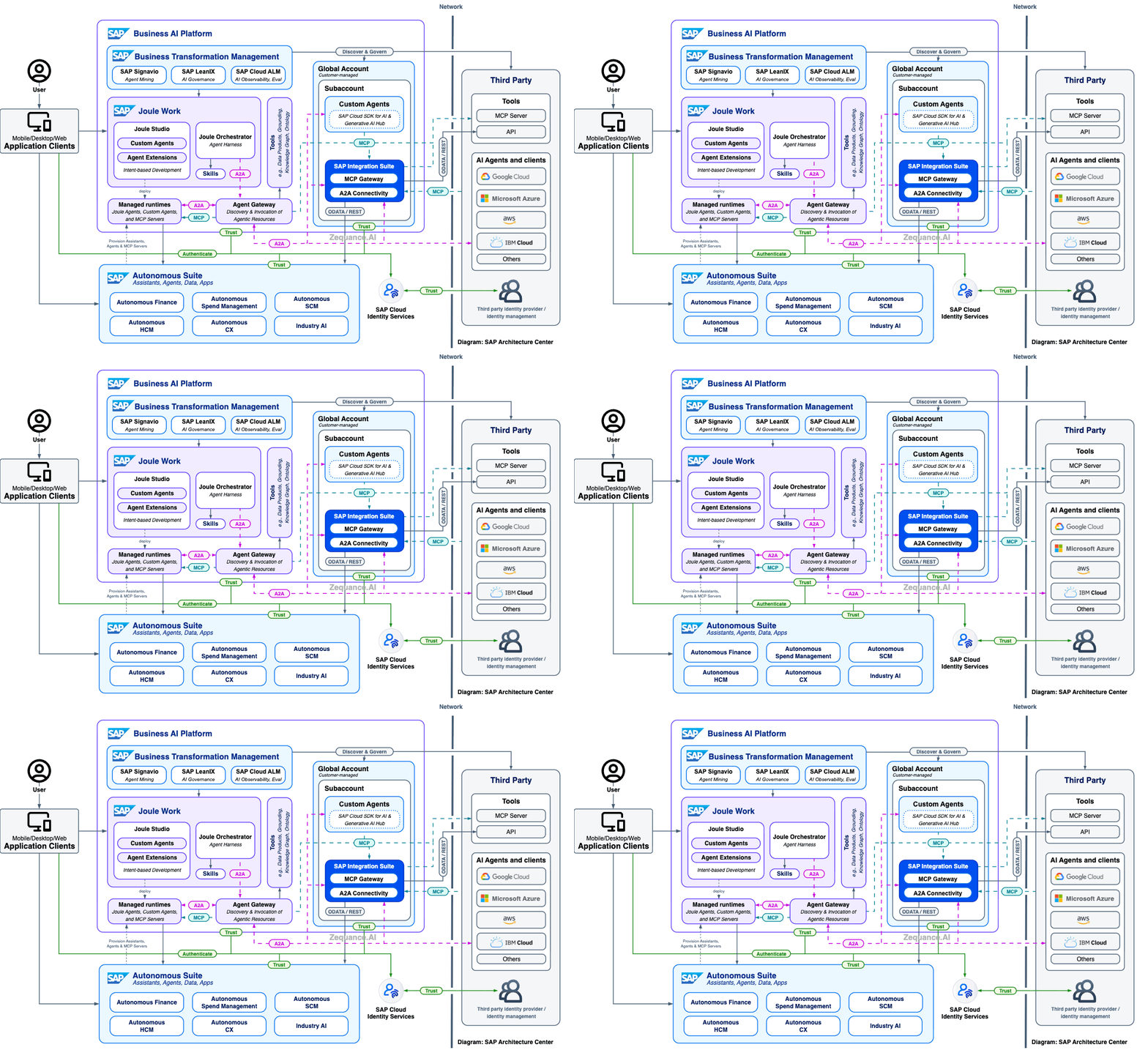
Reading the diagram, Integration Suite sits in a customer-managed SAP BTP subaccount, next to custom agents built with the SAP Cloud SDK for AI. It holds two pieces: the MCP Gateway and A2A Connectivity. The traffic flows look like this:
| From | Through | To |
|---|---|---|
| Custom agents in your subaccount | MCP | MCP Gateway |
| Third-party agents (Azure, AWS, Google Cloud, IBM Cloud) | MCP | MCP Gateway |
| Third-party agents | A2A | A2A Connectivity, routed to Agent Gateway |
| MCP Gateway | ODATA / REST | SAP Autonomous Suite and third-party APIs |
SAP Cloud Identity Services handles authentication and trust across the whole picture, including trust with third-party identity providers. The Architecture Center page also describes Integration Suite as adding security mediation, traffic management, monitoring and guaranteed delivery in hybrid landscapes. One honest caveat from that page: some components are not yet generally available, and bidirectional communication with third-party agents through the Agent Gateway is not supported yet.
Read the reference architecture yourself. The SAP Architecture Center page explains each component, the supported MCP sources and the current limitations.
Open the reference architectureWhat is coming next
SAP has shared a roadmap for what comes next. These are planned items, so timings can move:
| Capability | What it does | Timing shared |
|---|---|---|
| Hosted remote MCP servers | Expose a remote MCP server as a hosted MCP server inside Integration Suite | Q4 |
| MCP server from an iFlow | Turn existing integration flows into tools for agents | Planned |
| A2A adapter | Sender and receiver adapters so agents can call iFlows and iFlows can call agents | Planned |
| LLM gateway | Connect to SAP AI Core models with ready-made filtering, masking and anonymization policies | Planned |
| Specification-based iFlow generation | Extends today's prompt-based iFlow generation so a full spec document plus source and target schemas becomes a complex iFlow with mappings | Q4 |
| Reusable mapping generation | Generate reusable mapping artifacts with AI | Q1 |
| Multi-message error resolution | Root-cause analysis across several failed messages at once | Planned |
| Migration tooling | Modernization advice and conversion of adapter modules into Groovy scripts | Planned |
The LLM gateway is worth watching. It connects to the models available through Generative AI Hub in SAP AI Core, so agent calls to those models can pass through the same governance as everything else.
What this means for SAP professionals
The message is clear: integration skills are not shrinking in the agent era. They are becoming the foundation. A few practical takeaways:
In SAP's own words, governance is the new integration imperative. Agents and AI cannot be allowed to reach back-end systems uncontrolled, and Integration Suite is where SAP is building that control.
Key takeaways
- SAP Integration Suite is moving from connecting systems to governing AI agents, tools and models.
- The Enterprise AI Gateway has four parts: API Gateway, MCP Gateway, Model Gateway and A2A Gateway, all under one control plane.
- The MCP gateway turns APIs, RFCs and OpenAPI endpoints into governed tools, with default policies and full usage analytics.
- SAP calls the MCP gateway the endorsed pathway for third-party agents, customer-built agents and third-party MCP servers to access SAP systems.
- Some parts of the reference architecture are not generally available yet, so check SAP's latest documentation before you design.
We follow SAP's AI announcements closely and break them down every week in our free SAP AI newsletter at zequance.ai/news.
If you want a structured way to learn SAP AI and the concepts behind topics like this, the SAP AI Masterclass is a good place to start.

Alma TA is SAP AI Solutions Director at Zequance.AI, specializing in SAP Business AI, Joule, AI Core, and generative AI on SAP BTP. Drawing on her background in data science and enterprise analytics, she turns complex SAP AI concepts into practical guidance for consultants, architects, and business leaders.